Measure an Angle Between Implants and Abutments
To measure the angle between two implants:
Select an implant.
Click Implant angle  on the dedicated Implant tab.
Tip
The measure angles tool can also be accessed via Implant angle on the Diagnose tab of the Planning toolbar.
The cursor changes into a crosshair.
Select the second implant with the left mouse button.
An arched yellow line connecting the two implants is drawn.
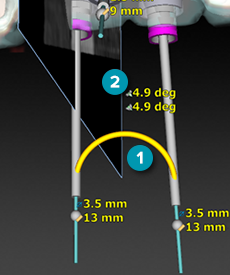
- The measurement text consists of an icon of angled implants with the value and the unit degrees.
- If the two implants both have an abutment, the icon of angled abutments with the value and the unit degrees is added above the angle implants. If there is only one abutment or no abutment at all, only one line is displayed. If the abutments are added later, the abutments angle is automatically added.
Note
Because two objects are needed for this measurement, the Implant angle button is disabled until an implant is selected.