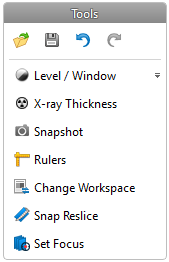
— Open: to open another scenario.
— Save: to save the changes made.
— Undo: to undo one or more actions.
— Redo: to redo one or more actions.
— Level / Window: to adjust the level and window settings of 2D images.
— X-ray Thickness: to adjust the thickness of X-ray slices.
— Snapshot: to take a picture of either the 3D or the 2D scene.
— Rulers: to show or hide rulers in the 2D scene. These items are elaborated in greater detail when in use.
— Change Workspace: to switch between workspace layouts.
— Snap Reslice: to snap the cross-sectional reslice to an implant or an anchor pin.
— Set Focus: to indicate the position you want the reslice to move to so you can inspect the cross section in the 2D view.